

Canva’s Magic Media: Unleash your imagination and create custom image
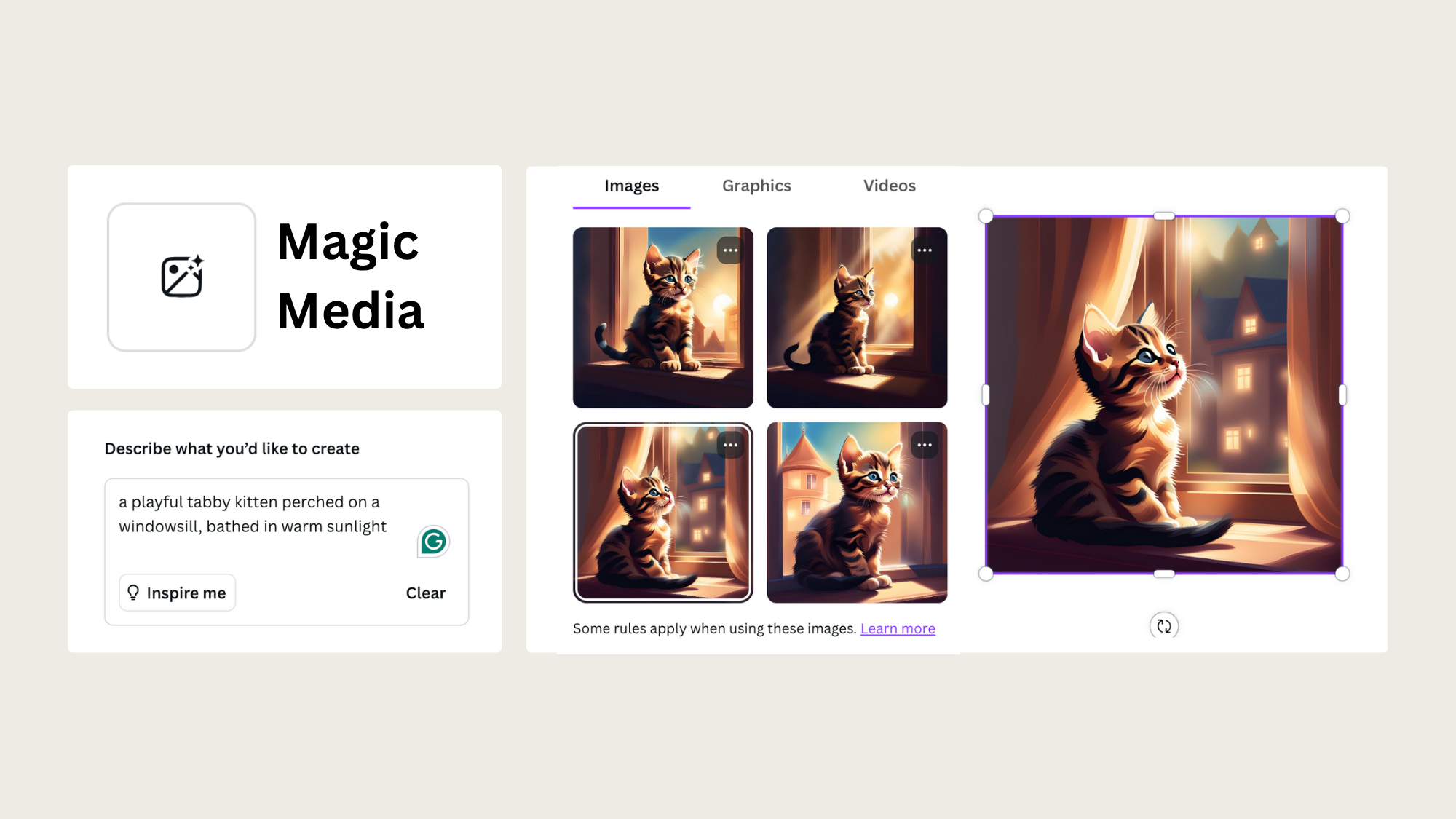
Canva has redefined the design landscape with its groundbreaking Magic Media feature. This AI-powered tool empowers users to generate custom images based on simple text prompts, offering unparalleled creative freedom and efficiency.
VIDEO: Revolutionize Your Design Process with Magic Media
What is Canva Magic Media? Your AI image generator inside Canva
Gone are the days of endless image searches. Canva Magic Media is an AI image generator built right into Canva, so you can create custom visuals by describing what you want in plain words. Type a short prompt, pick a style, and the tool generates images tailored to your project. No stock libraries, no wrestling with unfamiliar software.
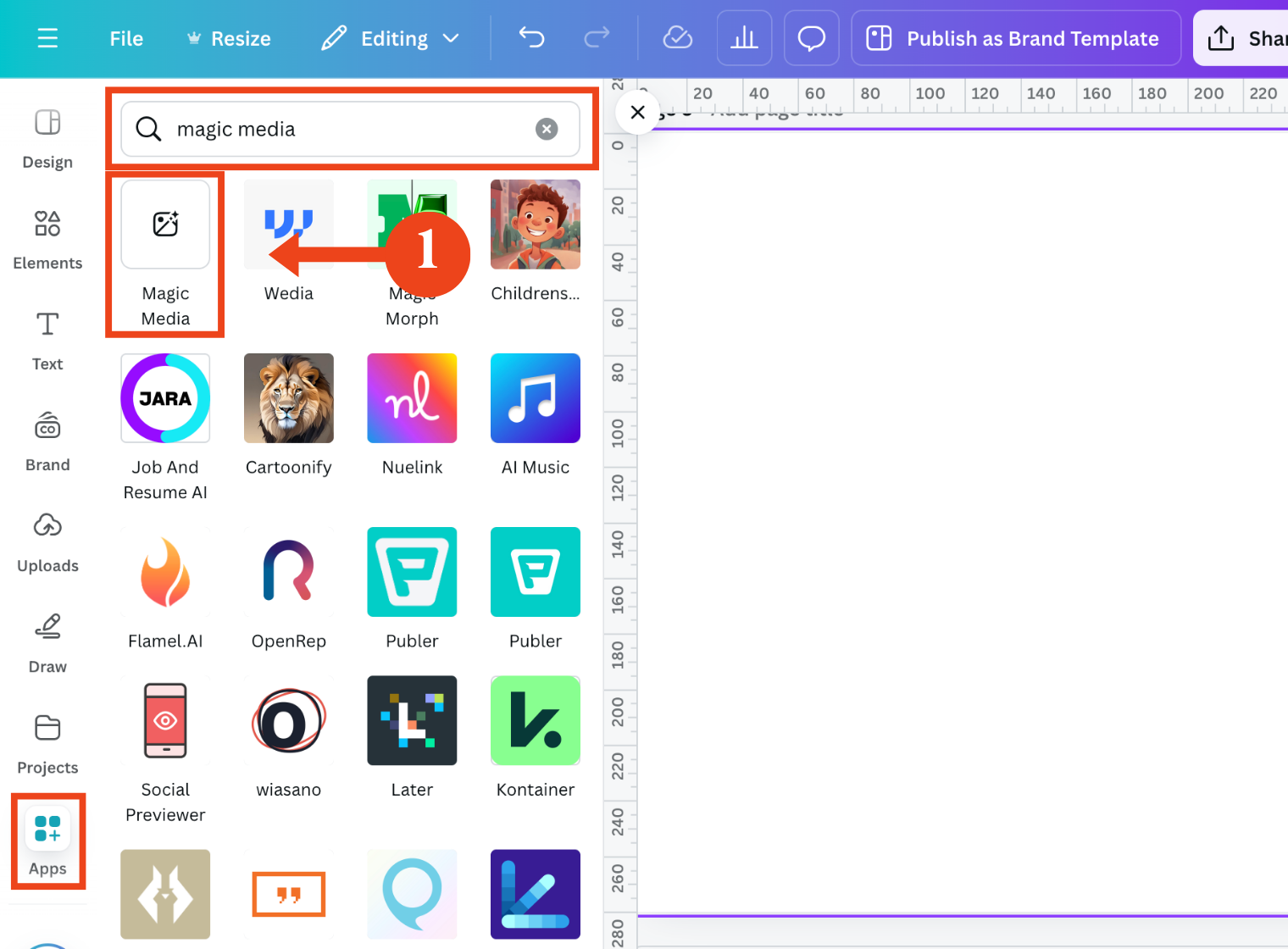
Step 1: Accessing the Magic Media Tool
Locate the Magic Media App: Within your Canva project, navigate to the “Apps” section. Search for “Magic Media” and click on it to open the tool.

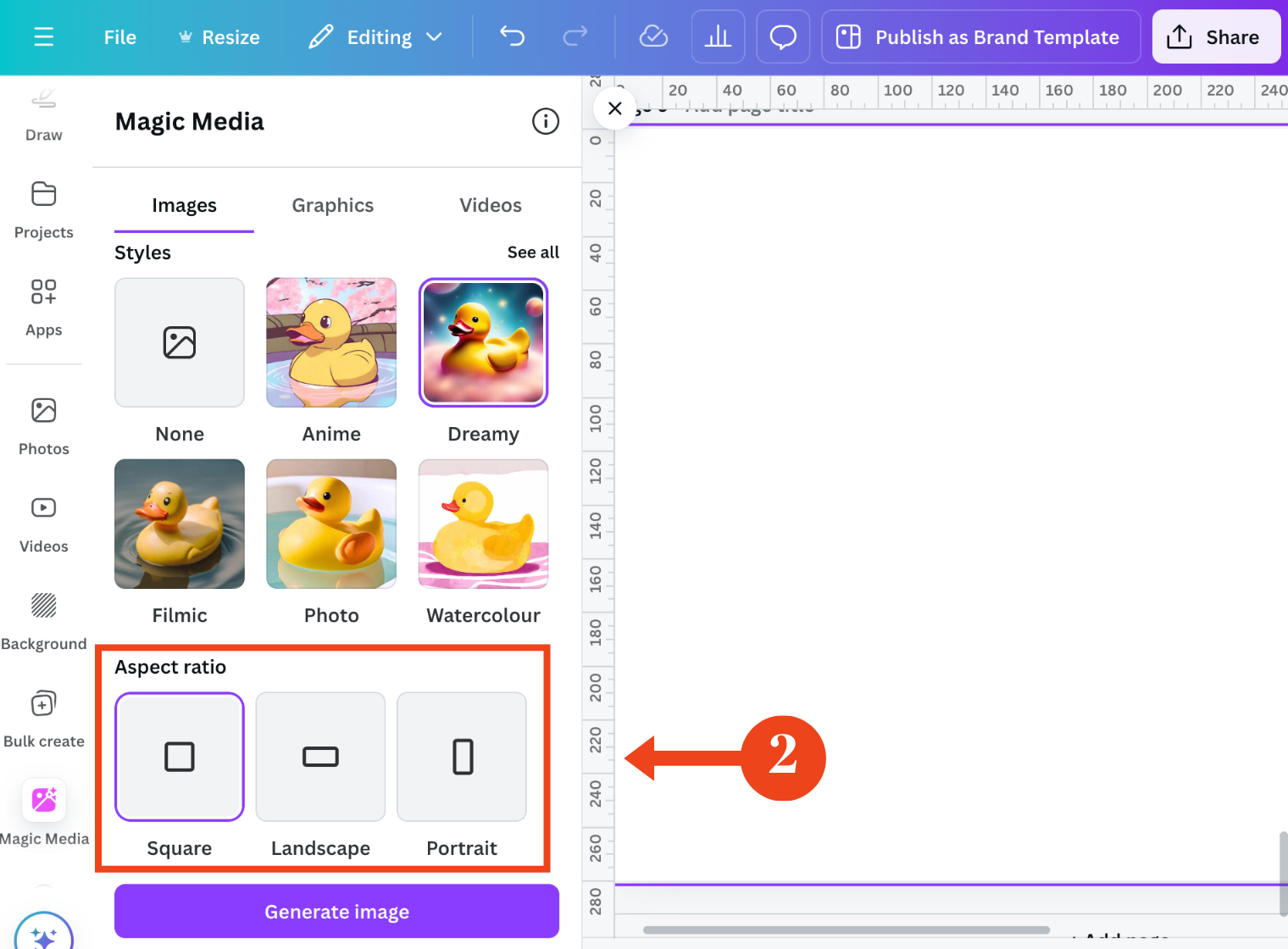
Step 2: Defining Your Image
Select Media Type: Choose between images, graphics, or videos based on your desired output.
Craft Your Image Description: In the provided text box, clearly and concisely describe the image you envision. Use vivid language, adjectives, and details to guide the AI. For example, instead of saying “a cat,” try “a playful tabby kitten perched on a windowsill, bathed in warm sunlight.“
Choose a Style: Select the desired artistic style for your image, such as photorealistic, art, or abstract.
Set Image Dimensions: Choose the aspect ratio that best suits your needs (e.g., square, landscape, portrait).

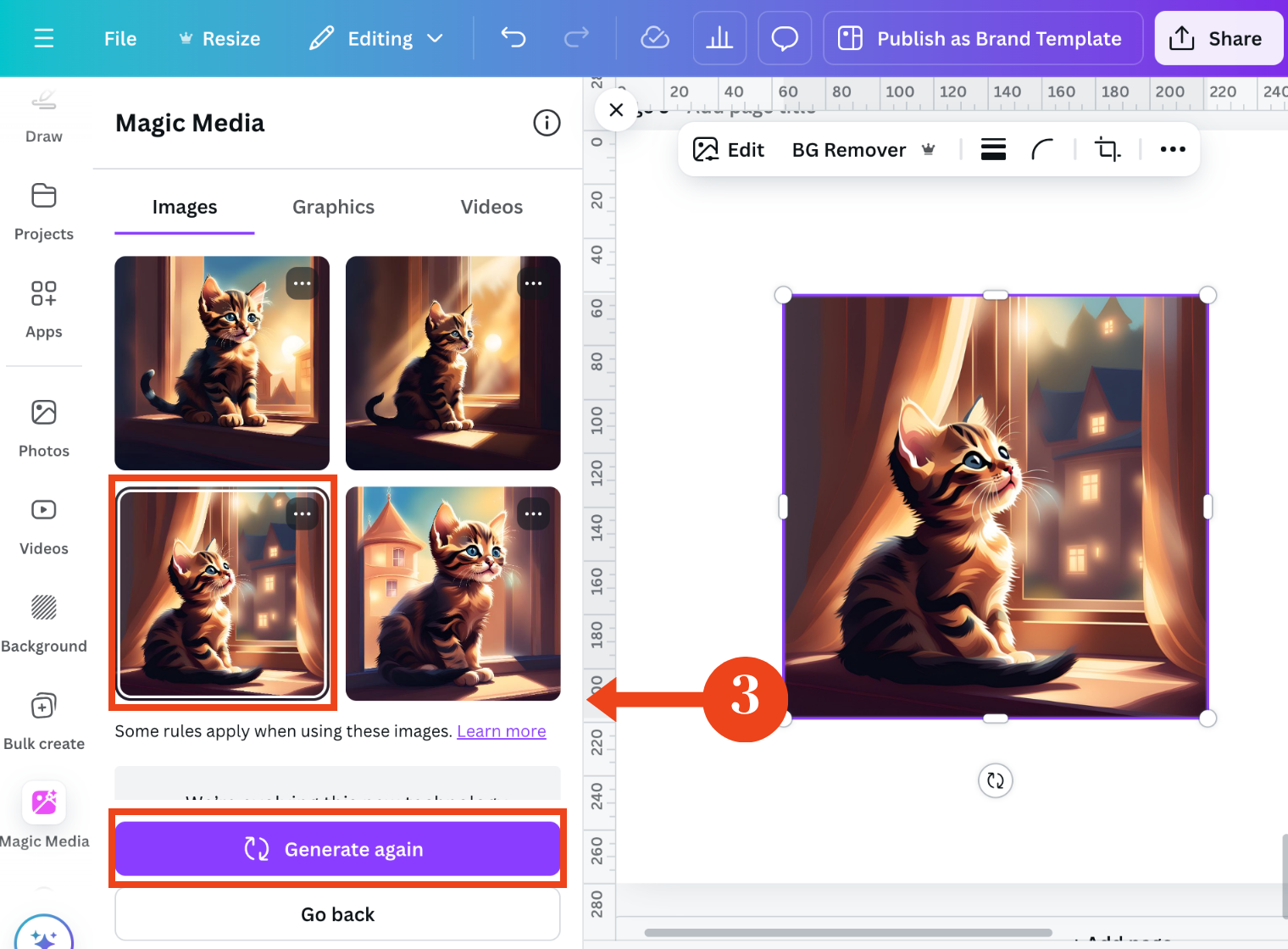
Step 3: Generating and Refining Your Image
Initiate Image Generation: Click the “Generate Image” button to let the AI process your request.
Review Generated Options: Magic Media will present multiple image options based on your description.
Select or Refine: Choose the image that best aligns with your vision, or click “Generate new results” to explore additional options. Refine your description if necessary.
Tips for Optimal Image Generation using Magic Media
Canva’s Magic Media is a game-changer for designers, marketers, and content creators alike. By harnessing the power of AI, you can quickly and easily generate custom images that perfectly complement your projects. Whether you need eye-catching social media graphics, stunning website visuals, or unique illustrations, Magic Media has you covered.
Here is a real example. On a recent client project, I needed a warm, lifestyle-style image of a home office for a coaching brand. Searching stock sites turned up the same tired laptop-on-a-desk shots I had seen a hundred times. Instead, I wrote a Magic Media prompt: [describe the exact prompt you used]. The first round gave me [describe the result], and after one small tweak to the lighting detail, I had a usable image in a couple of minutes. That is faster than I could have found, licensed, and edited a stock photo.
A quick before-and-after on prompt refinement: my first attempt was "woman working at a desk," which returned generic, flat results. I changed it to "a relaxed woman in her 40s working at a light wooden desk near a window, soft morning light, plants in the background, warm and calm mood." The difference was night and day. The second prompt gave me the mood and specificity the brand needed.
Canva text to image: prompt-writing tips that actually work
Magic Media is a text to image tool, which means the words you feed it decide everything. A vague prompt gives you vague results. A specific one gives you something you can actually use. The trick is to build your prompt in layers: subject, then style, then mood, then lighting, then detail.
Here is a simple formula to follow:
[subject] + [style] + [mood/setting] + [lighting] + [extra detail]
Try these tested prompt examples and adapt them to your own brand:
A ceramic coffee mug on a marble countertop, photorealistic, cozy morning setting, soft natural light, steam rising from the top.
A minimalist flat-lay of a planner and pen, editorial style, clean and calm, bright even lighting, muted neutral tones.
A leadership coach speaking to a small group, candid photo style, warm and confident mood, golden hour light through a window, shallow depth of field.
An abstract background of flowing shapes, modern art style, energetic mood, bold gradient lighting, brand colors of teal and coral.
A cozy reading nook with a blanket and books, lifestyle photography, relaxed and inviting, soft afternoon light, plants in the corner.
A product mockup of a skincare bottle, studio photography, premium and clean, bright softbox lighting, plain white background.
A hand writing in a notebook, close-up photo, focused and quiet mood, warm desk lamp light, blurred background.
Start specific, then refine. If the first result is close but not right, change one element at a time (the lighting, the mood, or a single detail) rather than rewriting the whole prompt.
Beyond Image Generation: Exploring Magic Media’s Potential
Magic Media is more than just an image generator; it’s a tool that empowers you to explore new creative possibilities. Here are some additional ways to utilize this powerful feature:
Brainstorming Visual Concepts: Use Magic Media to visualize ideas for your next project.
Creating Mood Boards: Generate a collection of images to inspire your design aesthetic.
Developing Brand Identity: Create visuals that align with your brand’s personality and messaging.
Overcoming Creative Blocks: Use Magic Media to spark inspiration and overcome creative challenges.
Generating Product Mockups: Create realistic product mockups to showcase your designs.
The future of design: AI and human collaboration
Canva’s Magic Media represents an exciting glimpse into the future of design. While AI can generate impressive images, human creativity remains essential for crafting truly exceptional designs. By combining the power of AI with your unique vision, you can create designs that stand out from the crowd.
Ethical considerations in AI-generated imagery
As AI technology advances, it’s important to consider the ethical implications of using AI-generated content. Be mindful of copyright and intellectual property rights, and use AI as a tool to enhance your creativity rather than replace it entirely.
By understanding the potential and limitations of AI-powered image generation, you can harness the power of Magic Media to create innovative and impactful designs.
Pro Tip: If you want to save hours of time and avoid getting lost in thousands of templates, colors, and fonts, Brand Magic with Canva will teach you how to think like a designer and help you build a solid foundation for using Canva and thinking like a designer.